
Running a WooCommerce store means constantly making decisions about products that are available, low in stock, or completely sold out. WooCommerce already provides a global option to hide out-of-stock products, but that setting is often too restrictive for stores with larger catalogs, seasonal products, frequently restocked items, or products that continue to generate search traffic even when they are temporarily unavailable.
That is exactly the problem Out of Stock Display Manager for WooCommerce is designed to solve.
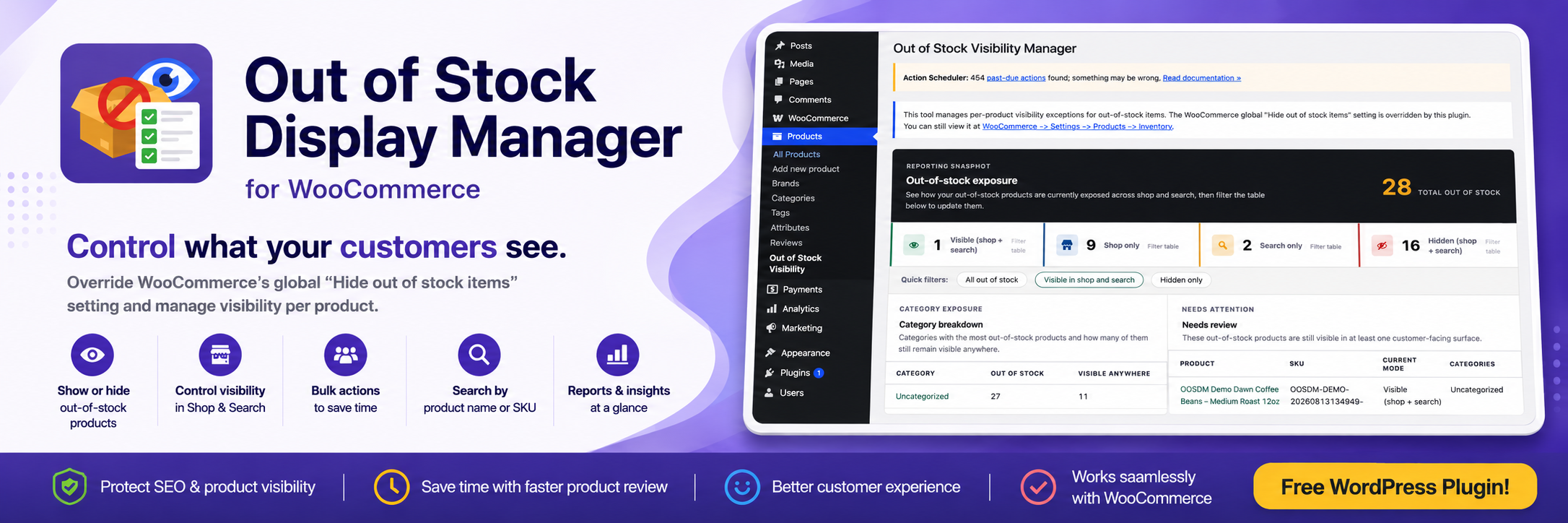
Instead of treating every sold-out product the same way, the plugin gives store owners more granular control over how individual out-of-stock products appear across their WooCommerce store.
You can decide whether a product should remain visible in the shop, remain searchable, appear in both locations, or be hidden entirely.
For businesses that want better control over catalog visibility without constantly modifying products manually or writing custom WooCommerce code, this provides a much more practical workflow.
The Problem with WooCommerce’s Global Out-of-Stock Setting
WooCommerce includes a setting that allows store owners to hide out-of-stock products from the catalog.
For smaller stores, this can work perfectly well.
The problem starts when your product catalog becomes more complicated.
Imagine that your store has 500 products and 40 of them are currently out of stock.
Some of those products may have been discontinued permanently. Hiding them makes sense.
But others might only be unavailable for a few days.
Some could be popular seasonal products that will return next month.
Others may have product pages that already rank in Google and receive organic traffic.
You may also have products that customers frequently search for, even when they are unavailable.
Using a single global setting forces all of those products to behave the same way.
You either hide all of them or keep all of them visible.
That lack of flexibility was the main reason behind creating Out of Stock Display Manager.
The plugin adds another layer of control on top of WooCommerce so that visibility can be managed on a product-by-product basis.
Decide Exactly Where an Out-of-Stock Product Appears
One of the core features of the plugin is the ability to decide where a sold-out product should remain visible.
For each out-of-stock product, you can choose whether it should appear in:
- Shop results
- Search results
- Both shop and search
- Neither shop nor search
This may seem like a small change, but it can make a significant difference when managing a large WooCommerce catalog.
For example, imagine that a popular product will be restocked next week.
Instead of removing it entirely from the store, you could keep it visible in search so existing customers can still find it.
Another product may still receive valuable traffic from category pages, so you may want it to remain visible in the shop.
A discontinued product, meanwhile, can be hidden from both areas.
This gives store owners a much more deliberate way of managing product visibility.
A Dedicated Out-of-Stock Visibility Dashboard
Managing products individually is useful, but it becomes inefficient when dozens or hundreds of products are unavailable.
That is why the plugin provides a dedicated management screen inside WordPress.
You can access it directly from:
Products → Out-of-Stock Visibility
The dashboard brings your out-of-stock products into a single interface where you can review their current visibility settings and make changes without opening every product individually.
This is especially useful for stores with large catalogs.
Instead of navigating through dozens of WooCommerce product-editing screens, the visibility manager becomes the central location for reviewing sold-out inventory.
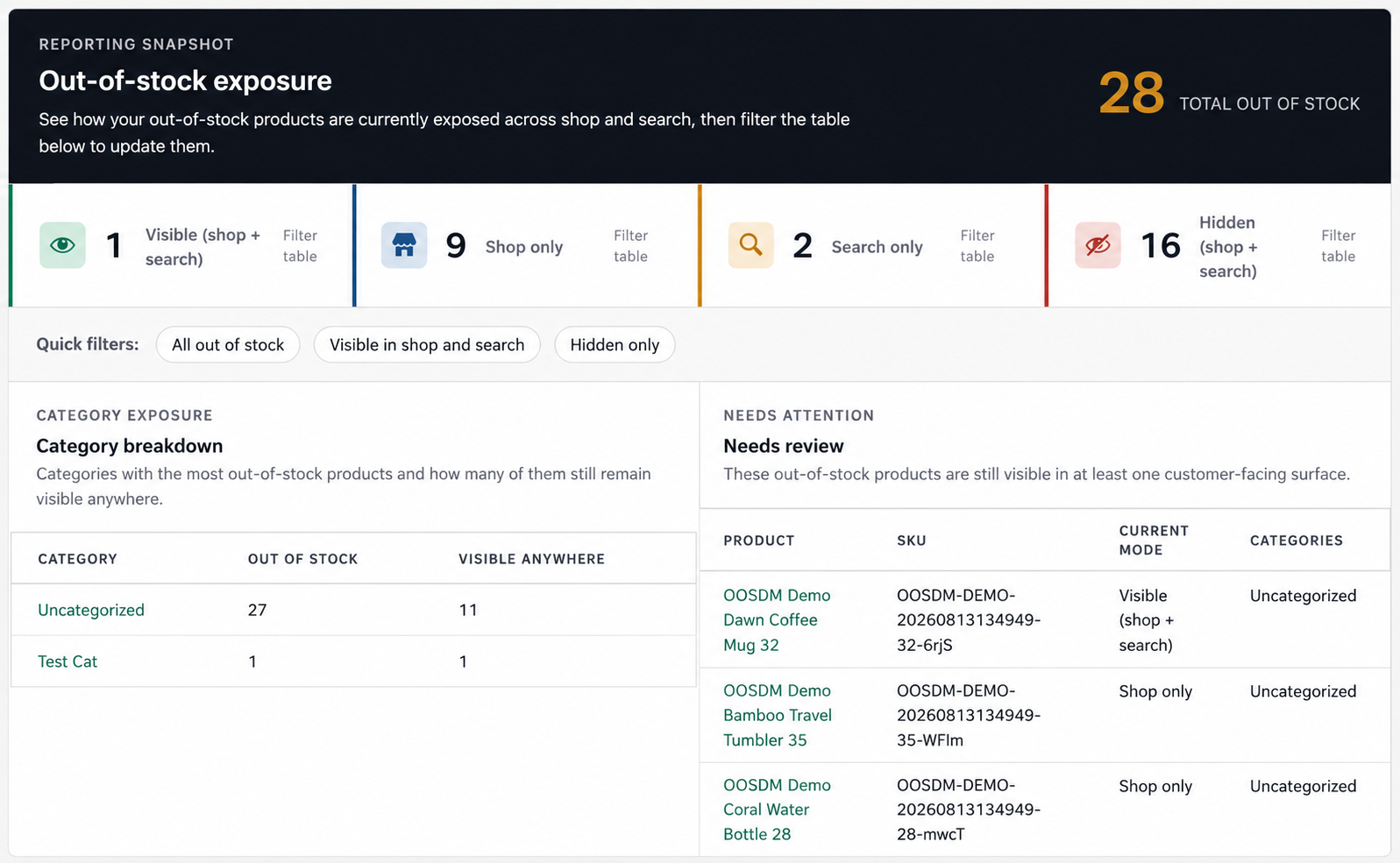
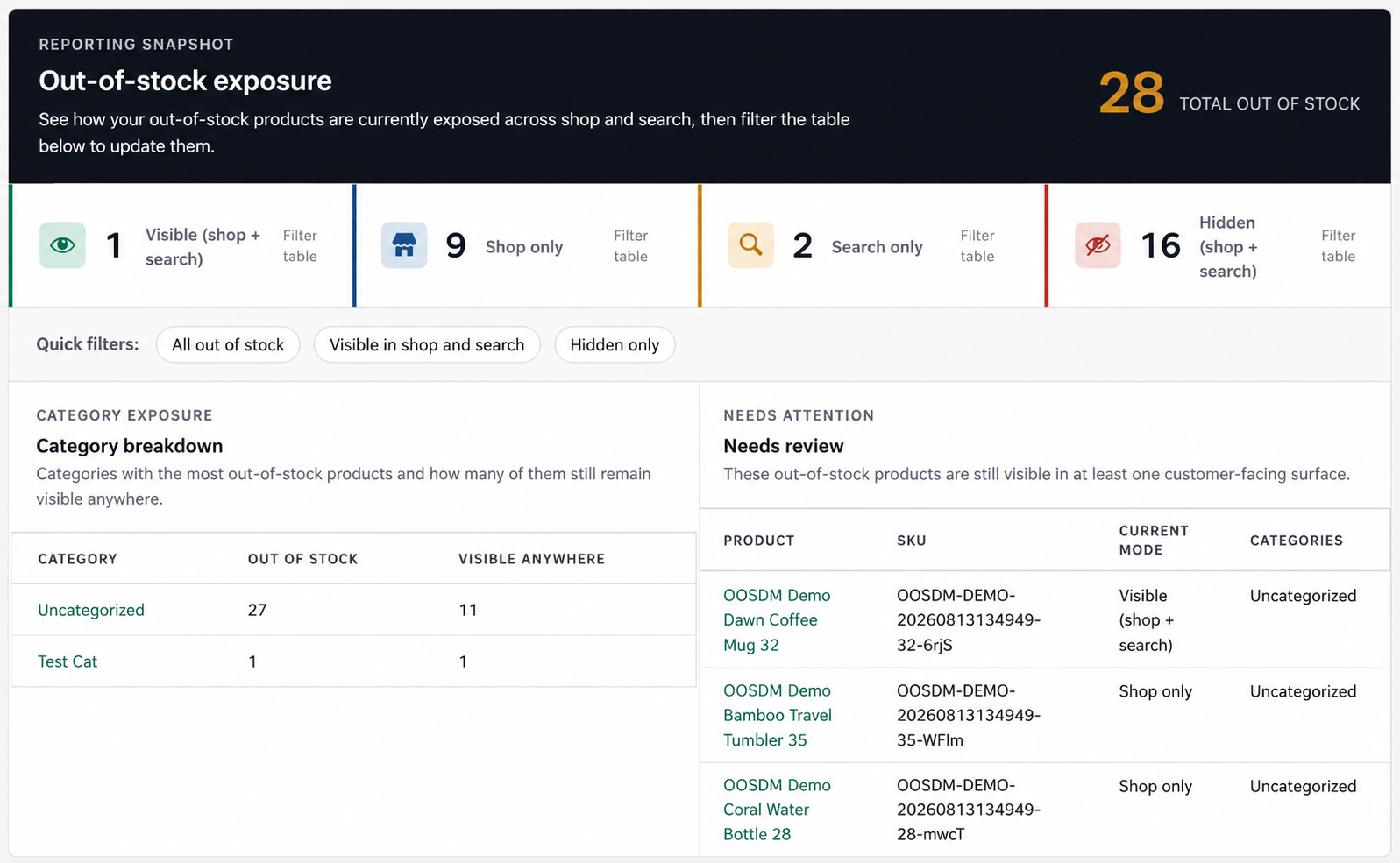
The plugin’s current reporting interface also provides an overview of how out-of-stock products are exposed across the store. WordPress.org describes the plugin as providing visibility summary cards, category breakdowns, quick filters, and a needs-review section to help identify sold-out products that are still visible to customers.
Quickly Understand Your Out-of-Stock Exposure
A major focus of the plugin is making out-of-stock information easier to understand at a glance.
The reporting snapshot shows how products are currently distributed between different visibility modes.
Instead of manually checking every product, store managers can immediately see categories such as:
Visible in shop and search
These are sold-out products that customers can still discover across both major WooCommerce browsing surfaces.
Shop only
These products remain available while customers browse the store but are not exposed through search.
Search only
These products can still be found by customers searching the site but may not appear while browsing shop or category listings.
Hidden
These products are removed from both shop and search visibility.
This overview makes it easier to notice unusual situations.
For example, if dozens of products remain visible even though they have been unavailable for months, that may be a signal that the catalog needs attention.
New in Version 2.3.0: Days Out of Stock
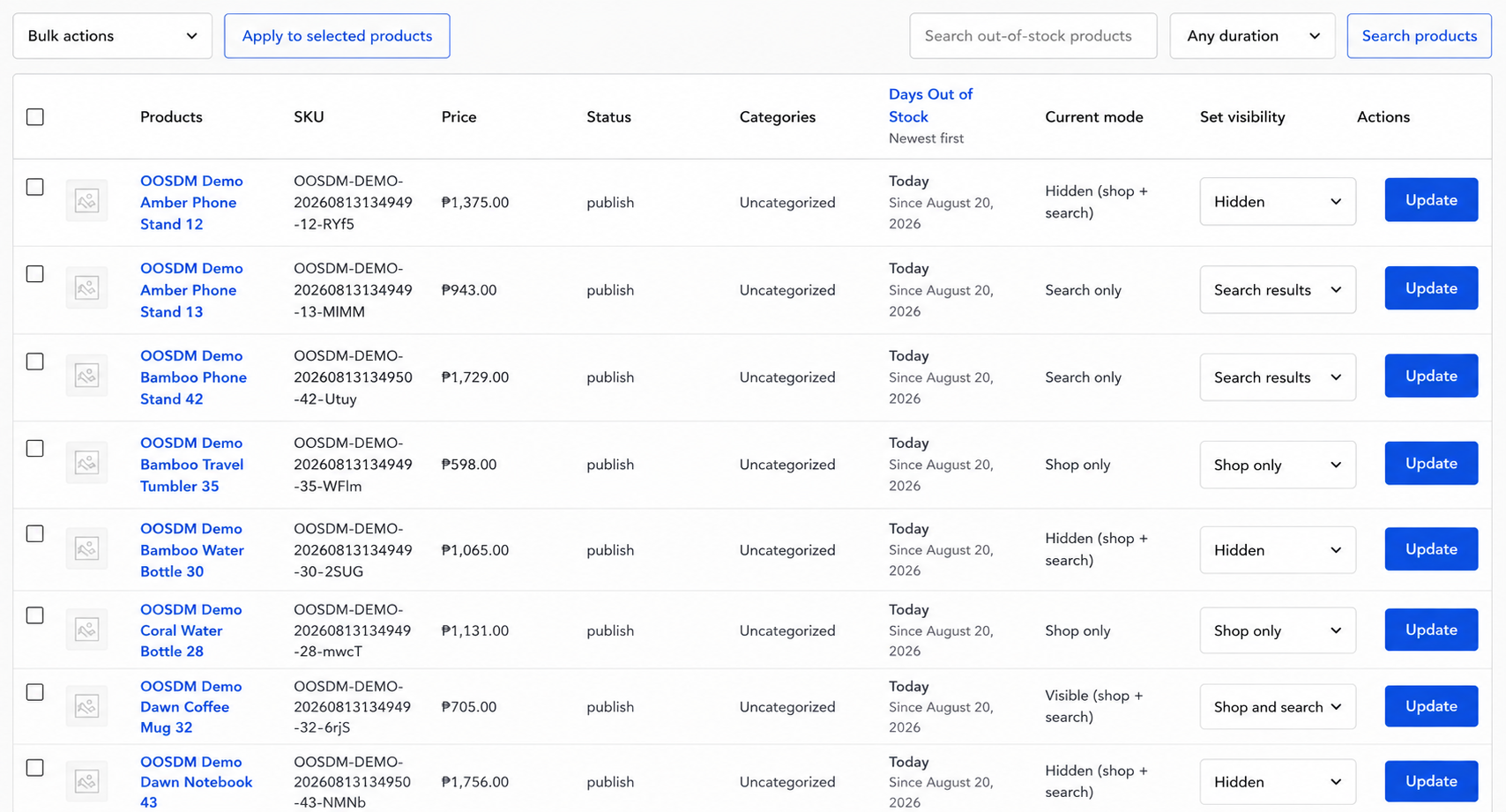
One of the most useful additions in version 2.3.0 is the ability to see how long a product has actually been out of stock.
The product table now includes a Days Out of Stock column.
Instead of simply knowing that a product is unavailable, you can see how long it has been continuously out of stock as well as the date when the out-of-stock period began.
This creates an entirely new dimension for catalog management.
Consider these two products:
Product A: Out of stock for 3 days
Product B: Out of stock for 187 days
Technically, both products have the same WooCommerce stock status.
From a business perspective, however, they represent completely different situations.
Product A may simply be waiting for an incoming shipment.
Product B may need investigation.
Perhaps the product should be discontinued.
Perhaps its supplier is no longer available.
Perhaps the page should remain visible for SEO but should no longer appear prominently in the shop.
By adding the duration of the out-of-stock period, the plugin helps store owners distinguish between temporary stock issues and long-standing catalog problems.
Filter Products by How Long They Have Been Out of Stock
Version 2.3.0 also adds an Out of Stock For duration filter.
This makes the Days Out of Stock information actionable.
Instead of scanning through the complete table, you can quickly narrow the list based on how long products have remained unavailable.
That creates several practical workflows.
For example, a store manager might periodically review products that have been out of stock for an extended period.
Those products may require decisions such as:
- Contacting a supplier
- Reordering inventory
- Hiding the product
- Keeping it visible for SEO
- Removing it from search
- Replacing it with a newer product
- Marking it as discontinued
As the catalog grows, this type of filtering becomes increasingly valuable.
It turns the plugin from a simple visibility control into a lightweight catalog-review tool.
Search Products by Name or SKU
WooCommerce stores often rely heavily on SKUs, particularly when inventories contain hundreds or thousands of products.
Searching only by product title is not always enough.
Version 2.3.0 improves the dashboard search behavior so that the visibility manager correctly matches products by SKU as well as product name.
This is particularly helpful for businesses where staff, warehouse teams, or suppliers refer to inventory primarily by SKU.
Instead of remembering the exact product title, you can enter the SKU directly and locate the correct out-of-stock product.
The official plugin listing also identifies product-name and SKU search as one of its key management features.
Bulk Actions Save Time
Product visibility management becomes much more useful when changes can be applied to several products at once.
The plugin includes bulk actions for updating multiple out-of-stock products.
Suppose a seasonal collection contains 20 products that will not return until next year.
Instead of modifying every product individually, those products can be selected and updated together.
The same approach can be used when a shipment is delayed, a supplier discontinues a product line, or a group of products needs to remain visible despite being temporarily unavailable.
For stores with larger inventories, bulk management can save a considerable amount of administrative time.
Category Breakdown Helps Identify Inventory Problems
The dashboard also provides a category breakdown showing where out-of-stock products are concentrated.
This can reveal patterns that are difficult to notice while looking at individual products.
For example:
Category A: 2 out-of-stock products
Category B: 5 out-of-stock products
Category C: 28 out-of-stock products
Category C clearly deserves investigation.
Perhaps there is a supplier issue.
Maybe that category is experiencing unusually high demand.
Or perhaps many obsolete products simply need to be reviewed and cleaned up.
The plugin does not attempt to replace a full inventory management system, but this type of reporting gives store owners useful signals about the health of their catalog.
Why Keep an Out-of-Stock Product Visible?
A common question is why a store would want customers to see something they cannot currently purchase.
There are several legitimate reasons.
Search Engine Optimization
A product page may already rank in Google.
If the product temporarily goes out of stock, hiding it completely can reduce its visibility to both users and potentially search engines depending on how the store is configured.
Keeping an established product page accessible may be preferable when you expect the product to return.
Customer Reference
Customers sometimes return to product pages after making a purchase.
They may want to review specifications, dimensions, instructions, compatibility information, or product descriptions.
A product being unavailable for new purchases does not necessarily mean its page has stopped being useful.
Future Restocks
If inventory will return soon, customers may still want to discover the product.
Keeping the page visible gives the store an opportunity to communicate that the item is temporarily unavailable rather than making it disappear entirely.
Seasonal Products
Many businesses sell products that regularly move between available and unavailable states.
Christmas products, summer collections, school supplies, seasonal equipment, and limited production items are good examples.
Removing these products from the catalog every time the season ends may not be desirable.
High-Demand Products
Popular products frequently sell out.
If customers already know the product exists, completely hiding it can create confusion.
Keeping the product visible can reassure customers that it is still part of the catalog and may be available again.
The plugin’s WordPress.org listing specifically identifies SEO value, customer reference, seasonal demand, and future restocks as common reasons for keeping selected sold-out products visible.
What the Plugin Does Not Do
It is important to understand that Out of Stock Display Manager is not an inventory replacement.
WooCommerce continues to manage:
- Stock quantities
- Stock status
- Inventory tracking
- Backorders
- Product purchasing
The plugin focuses specifically on visibility.
It determines how products that WooCommerce already considers out of stock should appear to customers.
This separation keeps the plugin focused while allowing store owners to continue using WooCommerce’s existing inventory features normally.
Who Is This Plugin For?
Out of Stock Display Manager is particularly useful for WooCommerce stores that have:
- Large product catalogs
- Frequently restocked inventory
- Seasonal products
- Products with strong organic search traffic
- Temporary supplier shortages
- Popular items that sell out frequently
- Product pages customers still need for reference
It can also be useful for developers and agencies managing WooCommerce stores on behalf of clients.
Instead of building custom visibility logic for every project, the plugin provides a dedicated interface that store managers can use themselves.
A Cleaner Dashboard in Version 2.3.0
Version 2.3.0 also includes a visual redesign of the Out of Stock Visibility Manager dashboard.
The goal of the redesign is not simply cosmetic.
When a dashboard contains summary statistics, filters, categories, product tables, and management actions, information hierarchy becomes important.
The updated interface uses a cleaner and flatter visual style, with improvements to:
- Summary cards
- Category breakdowns
- Needs-review panels
- Spacing
- Borders
- Typography
- Overall readability
The intention is to make the dashboard easier to scan so store managers can identify problems and take action faster.
Combined with the Days Out of Stock functionality, the dashboard is gradually becoming more than a simple list of sold-out products.
It is becoming a practical workspace for understanding and managing out-of-stock catalog exposure.
Better Control Without Custom Code
One of the main goals of Out of Stock Display Manager is simplicity.
There are many ways developers can customize WooCommerce using PHP hooks and filters.
But most business owners should not need to maintain custom code just to decide whether one sold-out product appears in search while another remains hidden.
The plugin turns that technical behavior into an admin interface.
For store owners, that means fewer code changes.
For developers, it means fewer one-off customizations to maintain.
And for teams managing larger product catalogs, it provides one central place to review out-of-stock visibility.
Final Thoughts
Out-of-stock products are often treated as a simple inventory problem:
A product is either available or unavailable.
In reality, the business decision is more complicated.
Some unavailable products should disappear immediately.
Some should remain searchable.
Some should stay visible because they will be restocked.
Some have valuable product pages that should remain accessible.
And some have been out of stock for so long that they need to be reviewed altogether.
Out of Stock Display Manager for WooCommerce is built around that distinction.
It gives WooCommerce store owners finer control over sold-out product visibility while providing tools to search, filter, bulk-manage, and review those products from one dashboard.
With version 2.3.0 adding a redesigned interface, SKU search improvements, the new Days Out of Stock column, and duration-based filtering, the plugin provides an increasingly useful way to understand not only which products are out of stock, but which ones actually require attention.
If your WooCommerce catalog contains products that should not all be treated the same way when they sell out, Out of Stock Display Manager offers a straightforward way to take control.
Out of Stock Display Manager for WooCommerce is available as a free plugin from the WordPress Plugin Directory.
